
Tired of moving your construction equipment just for a check-up? With on-site diagnostics Jaltest OHW, you can read ECU fault codes, perform compression tests, or run regenerations directly on-site. This makes your daily work faster, safer, and more efficient.
In this article, we’ll explain how this online tool can transform the daily work of off-highway and agricultural equipment technicians.
🚜 What Makes Jaltest Info Web OHW Unique?
Jaltest Info Web OHW is an online technical information platform designed for off-highway machinery: excavators, loaders, bulldozers, graders, and more.
- ⏱ Time required: Just seconds to find the right information
- ⚙️ Difficulty: None. All you need is an internet connection and access to your Jaltest Info Web account.
🔧 The 3 Must-Have Features
1. Detailed ECU Data
Get access to fault codes, live data, wiring diagrams, and OEM-level procedures.
Why it matters:
- Save valuable time by avoiding manual research
- Get accurate, manufacturer-validated information
2. Test and Calibration Procedures
Need to launch a DPF regeneration or compression test? You’ll find the exact step-by-step procedure.
Advantage: No guessing, no YouTube searches—everything is clearly explained.
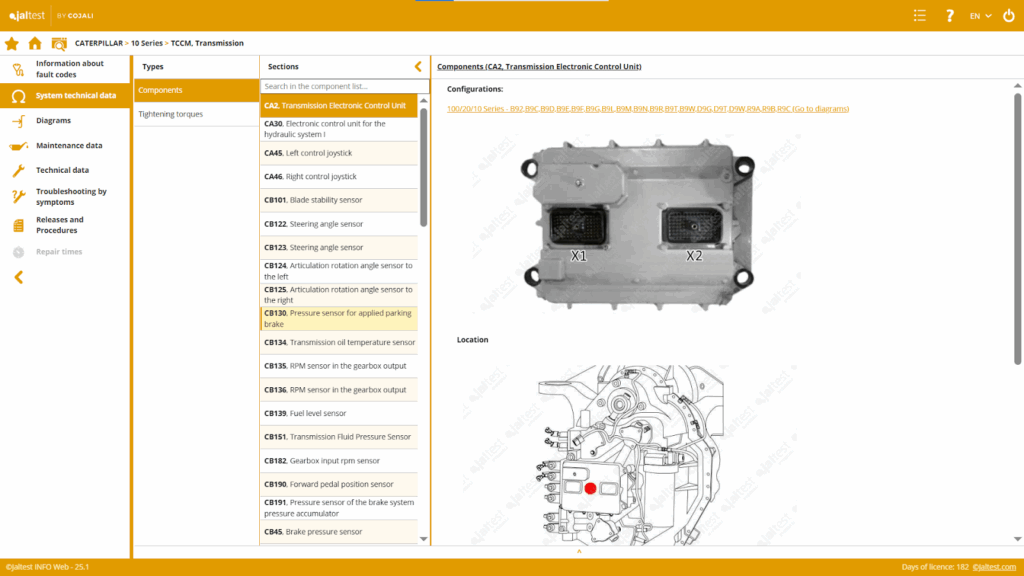
3. Maintenance Data & Reference Values
Need the torque setting for an injector? The official maintenance schedule? It’s all included.
Examples:
- Drain interval tables
- Injection system settings
- Sensor and relay locations
🧰 Step-by-Step: Work on-site with Jaltest Info Web OHW
✅ Step 1: Identify the Machine
Enter the brand, model, or serial number to access the technical file.
✅ Step 2: Access Fault Codes
Use the ECU file to view active or stored faults. Check the troubleshooting guides.
✅ Step 3: Run a Test or Regeneration
Follow the on-screen, step-by-step instructions (from your computer or tablet) to work safely.
✅ Step 4: Compare Values
Compare live sensor data with OEM reference values. In minutes, you’ll know if a sensor is faulty or misconfigured.
✅ Step 5: Save or Print
Generate a diagnostic report to archive or send to your client.
✅ Why It’s a Game Changer
- No need to tow the machine to the shop
- Perform full diagnostics in minutes
- Boost your professionalism and transparency
🧪 Never tried it before? Now’s your chance.
👉 Click here to request access and start running diagnostics, regenerations, and tests directly on your equipment.